
SAG Wiki: A Lightweight, Low-Cost, Precise Local Knowledge Base
Introducing SAG Wiki, the open-source knowledge base powered by SAG2, with folder-based organization, fast indexing and retrieval, and desktop and CLI access for people and agents.
Open source: https://github.com/Zleap-AI/SAG-Wiki
Yesterday, we released SAG2, a lighter, faster and more precise retrieval technology.
Today, we would like to introduce SAG Wiki, an open-source knowledge base application built on SAG2.
We have always wanted a knowledge base to do three things well at the same time:
- Stay lightweight, with knowledge bases that are easy to create and manage.
- Keep costs low enough to handle large collections of material.
- Retrieve accurately, so you can actually find what you need.
SAG Wiki delivers all three.
Lightweight: Easier to Create and Manage
SAG Wiki organizes knowledge the same way you already manage files and folders. There is no vector database to deploy or maintain separately.
This simple architecture makes for a compact desktop application: the Windows installer is about 9.5 MB, and the macOS installer about 12.5 MB.
Open the application and add a local folder. That folder becomes a searchable knowledge base. Documents, notes and code inside it can be searched semantically. Enable the document conversion component to include PDF, Office and other formats.
You can even add every folder where you keep reference material and let SAG Wiki scan them together. Search or ask questions across folders without first having to remember where you put a file.
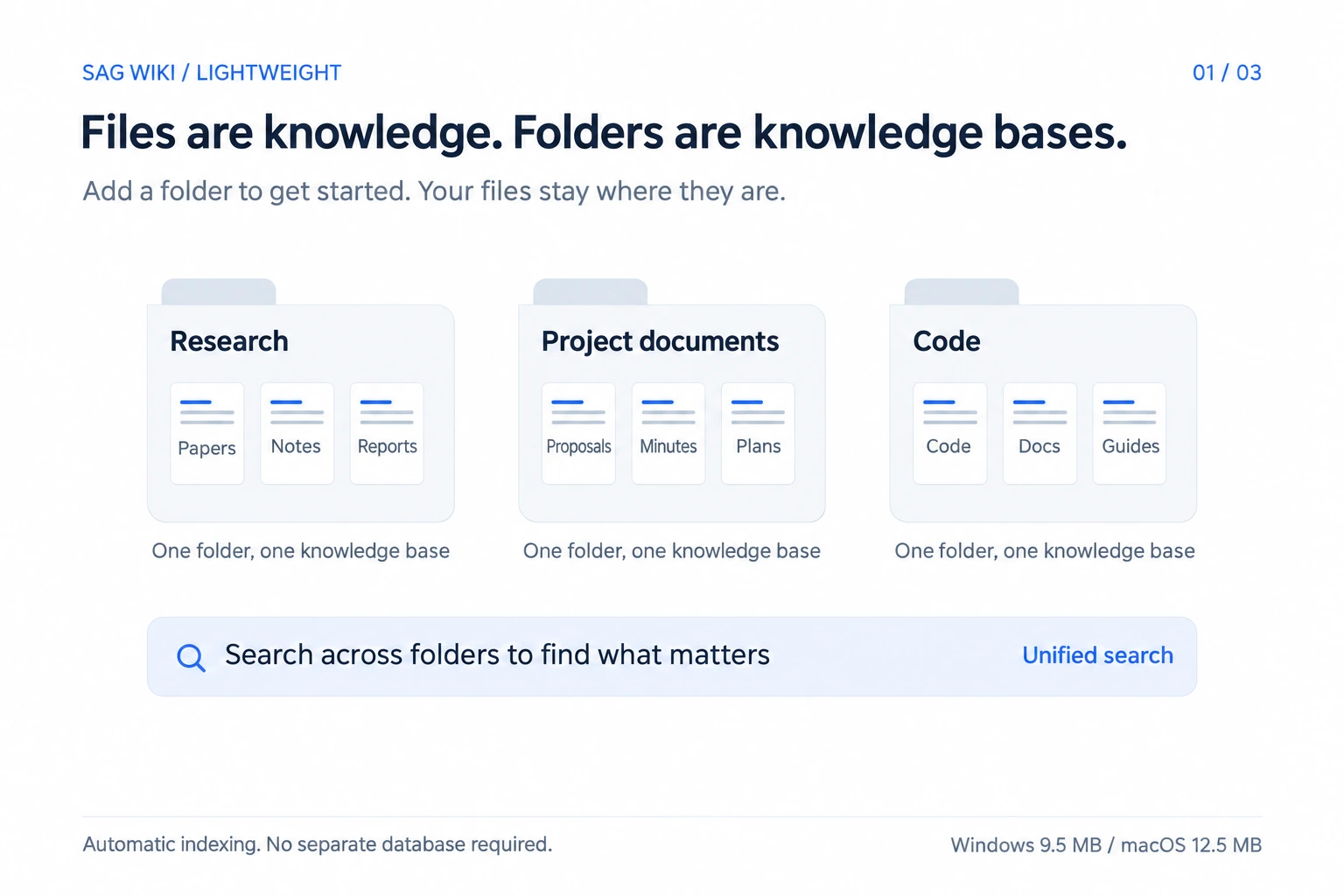
Your files stay where they are. You can keep your folder structure, editors and working habits. You do not need to maintain a second set of knowledge pages or upload your files again.
When a file changes, the knowledge base changes with it. Replace or delete an outdated version, and subsequent retrieval reflects that change.
Low Cost: Index 2.4 Billion Characters with No Model Fees
A typical LLM Wiki asks an LLM to read the material document by document and organize it into knowledge pages. That is manageable with a small collection. At hundreds of thousands of documents, the time and token cost of processing every source become a problem.
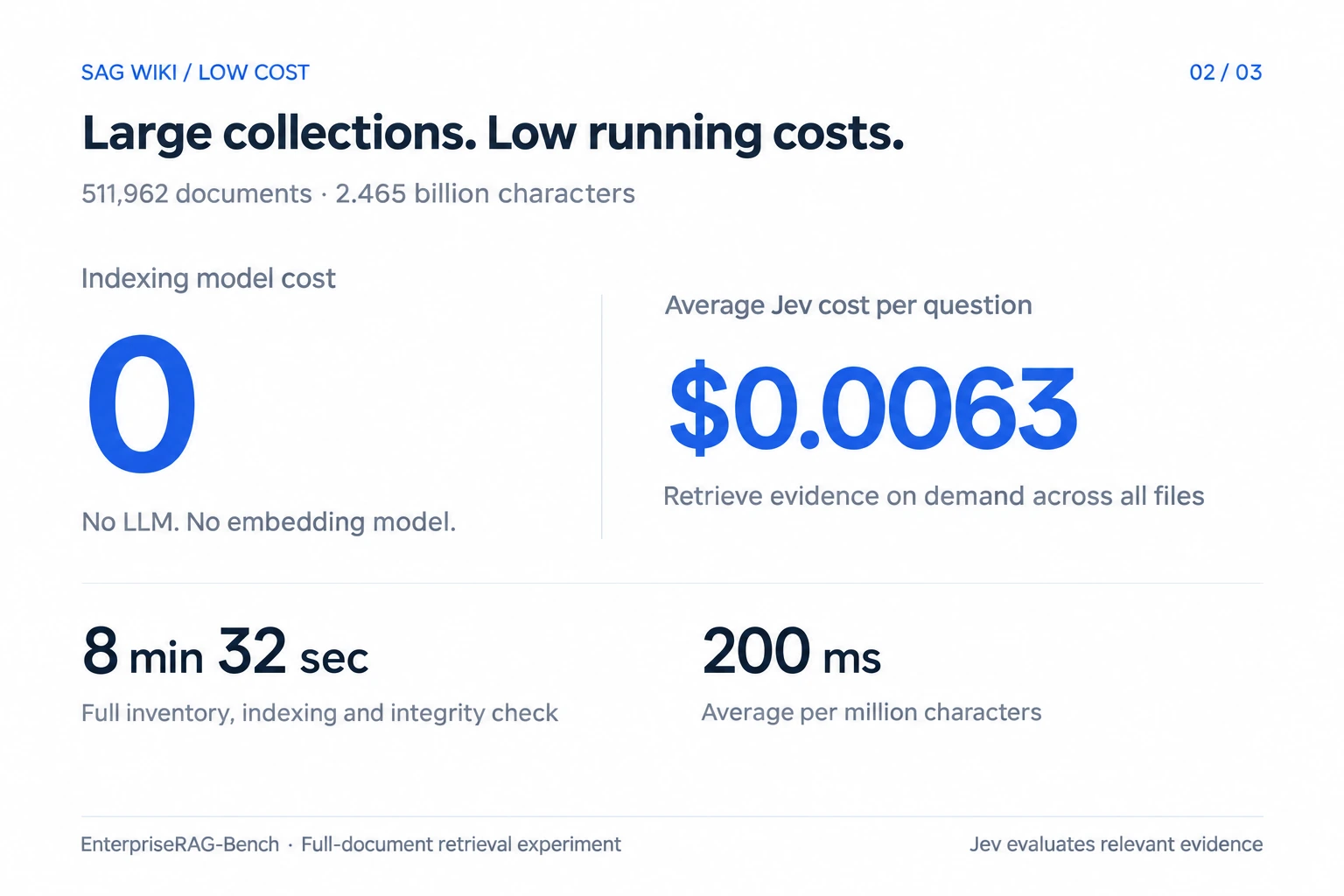
SAG Wiki indexes the original text directly. It does not require an LLM to read or summarize it in advance, or generate embeddings for every document. The model cost of indexing is zero.
Indexing is also fast. On the complete EnterpriseRAG-Bench dataset, it took 8 minutes and 32 seconds to inventory, index and check the integrity of 511,962 enterprise documents containing approximately 2.465 billion characters. That averages about 200 milliseconds per million characters.
During a search, SAG Wiki calls Jev to judge relevant evidence. This incurs a small model cost. In our tests on this collection, Jev calls cost an average of approximately $0.0063 per question.
Retrieval is inexpensive and fast. SAG2 avoids the time and cost of having an LLM repeatedly try search terms and read large amounts of intermediate results. A single retrieval takes 1–3 seconds.
You can add an entire project folder instead of selecting a small subset of files to save preprocessing costs. After editing a file, you do not need to ask an LLM to rewrite the corresponding knowledge pages.
Precise: Lower Cost and Better Retrieval
The value of a knowledge base ultimately depends on whether it finds the material you need. When the evidence for a question is spread across several files, finding only one often is not enough.
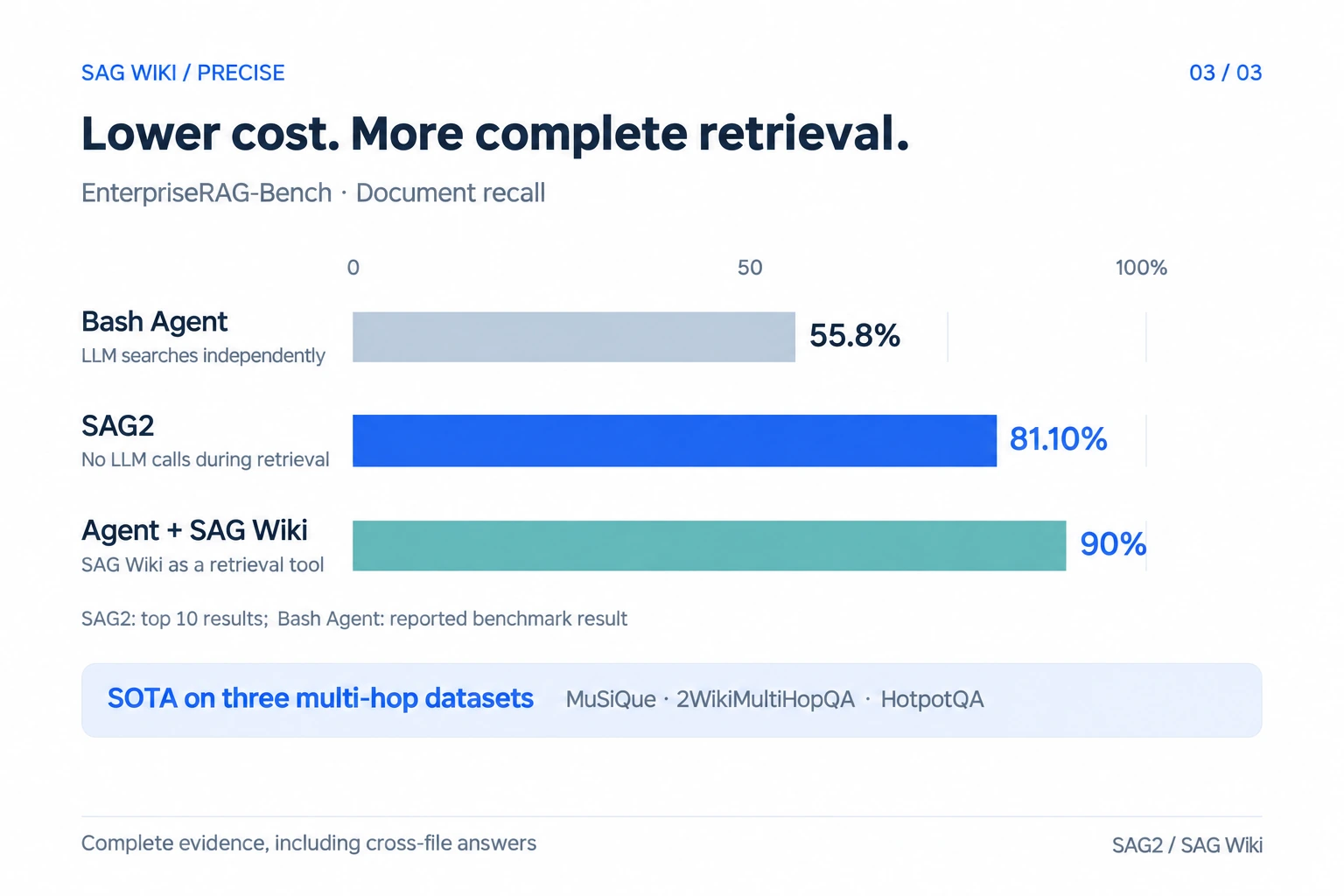
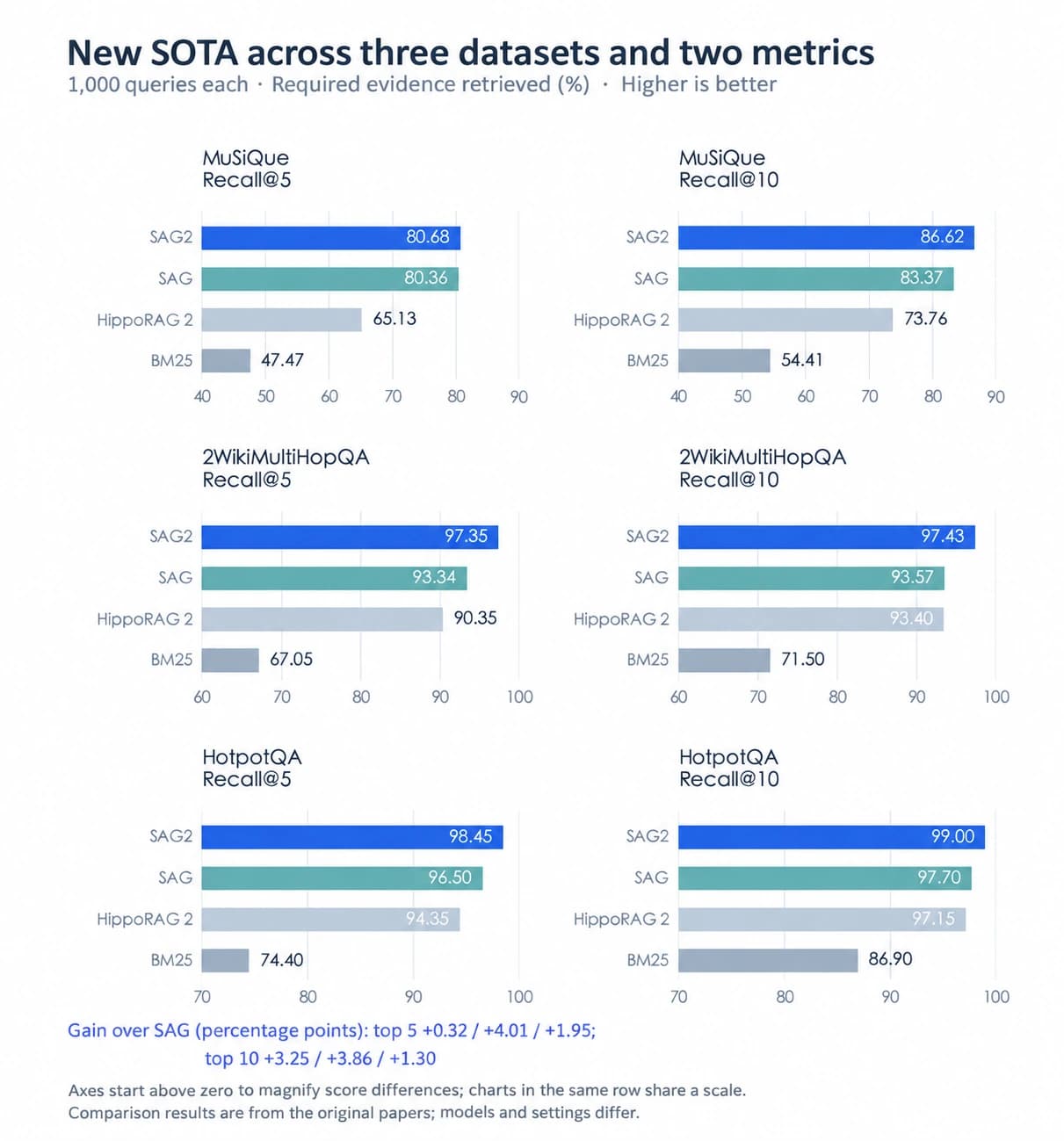
In our experiments, the SAG2 retrieval technology used by SAG Wiki surpassed the previous generation of SAG and achieved a new state of the art on three multi-hop retrieval datasets: MuSiQue, 2WikiMultiHopQA and HotpotQA.
On the benchmark of 510,000 enterprise documents mentioned above, a Bash Agent that uses an LLM to run conventional search commands retrieved only 55.8% of the required documents.
SAG2 retrieved 81.10% of the required documents with one retrieval call and no LLM calls, outperforming all the older methods.
Results can improve further when an agent uses SAG2 as a retrieval tool and an LLM guides multiple searches. The agent can ask follow-up questions based on material already found, retrieve additional evidence and combine the results. On enterprise document retrieval, an agent combined with SAG2 can achieve 90% document recall.
See our paper for the detailed data and experiments.
SAG2 paper and full evaluation: https://arxiv.org/abs/2610.22588
Install It for Your Agent
SAG Wiki is designed for agents as well as people.
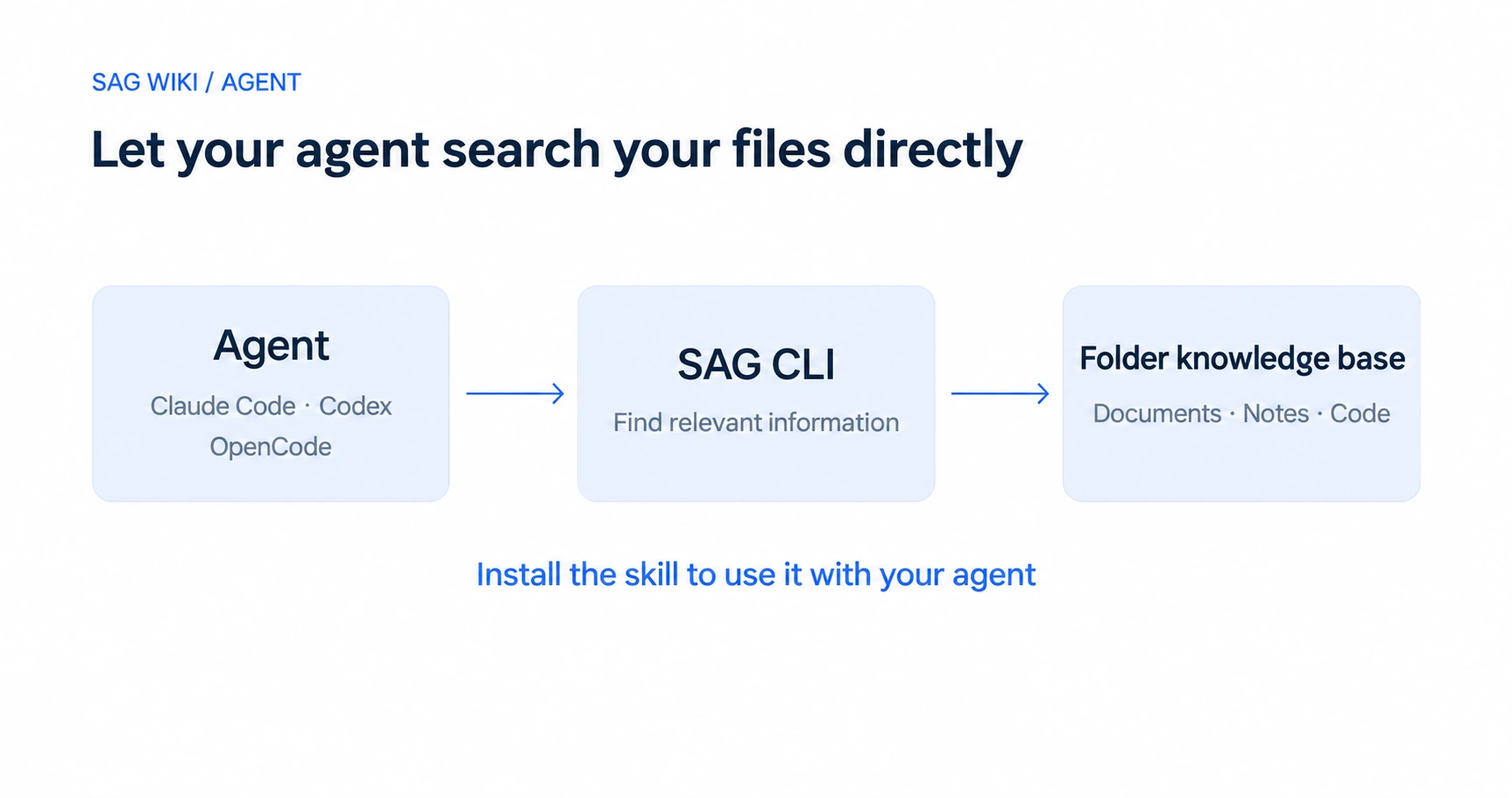
In Claude Code, Codex or OpenCode, send your agent this instruction to get started:
Please install https://github.com/Zleap-AI/SAG-Wiki/blob/main/cli/skills/sag/SKILL.md and follow its setup process to configure the current project.
The agent will follow the guide to install SAG CLI. On first use, configure your Jev API key as prompted. The agent will index the current project folder and check that retrieval works. Then start a new agent session to use it.
SAG CLI indexes folders and runs searches from the command line. The skill tells the agent how to call it. Your agent can then use the project folder as a knowledge base while analyzing the project, finding information or modifying code.
Use the desktop application to browse and manage material, or install only the CLI and work entirely through your agent. The desktop app and CLI share the same core and configuration, so you can use both together.
Breaking the Three-Way Trade-Off
SAG Wiki breaks the knowledge base trade-off: lightweight, accurate and inexpensive at the same time.
We want creating a knowledge base to be simple. Knowledge stays in files, and knowledge bases are organized by folder. Edit files and manage folders as usual, then retrieve their content when you need it.
You can get precise knowledge retrieval without maintaining multiple databases or paying to preprocess large collections with LLMs or embeddings. Personal notes, project directories and team document folders can all become knowledge bases.
To me, this is how a knowledge base should work.
SAG Wiki is open source. Please try it and share your experience with us.
Open source: https://github.com/Zleap-AI/SAG-Wiki
Downloads: https://github.com/Zleap-AI/SAG-Wiki/releases
Website: https://zleap.com/
WeChat group: Open the Zleap official account, select Contact Us, and scan the code to join.
Keep reading
Technology
Introducing SAG2: A New State of the Art, 7,000× Faster Indexing, No Vectors, Just Files
SAG2 combines keyword indexing with dynamic multi-hop retrieval. Explore indexing performance, public benchmarks, SAG Wiki and applications in agent memory.

Insights
From Tools to Employees: Trends, Principles, and Boundaries of AI Automation
Examining AI automation through capability, economics, and society, and defining authority, accountability, and collaboration between people and agents.
Insights
The Coordination Deficit: Individuals Accelerate, Enterprises Stall
Why individual AI productivity does not automatically improve organizational performance, and how shared knowledge, agent governance and field implementation can help.